
What is Dynamic Email, Benefits, and How to Set up a Campaign
By Ryane Tully · June 19, 2024
Helpful Summary
Overview: Dynamic email personalizes content based on recipient preferences, behaviors, and data, enhancing engagement and conversion rates.
Why you can trust us: Pitchlane’s success with dynamic emails is demonstrated by helping Vendisys triple its bookings with personalized video emails (dynamic email content).
Why it matters: Dynamic emails increase engagement, improve customer experience, boost conversion rates, and save time by automating personalized content delivery.
Action points: Collect recipient data, segment your audience, use a dynamic email platform, and set up templates with dynamic content blocks.
Further research: Read more about dynamic email and personalization in our blog post section.
Need Help Figuring Out How To Create Dynamic Emails?
Email marketing has an impressive return on investment (ROI), with brands often seeing a return of $42 for every dollar spent. It remains an effective way for businesses to connect with customers.
However, many email marketers fail to get the recipient’s attention effectively. This is where dynamic email comes into play.
Dynamic email delivers personalized, relevant content tailored to each recipient’s preferences and behaviors. This article from Pitchlane will show you how to use it. We’ll dive into the types, benefits, and everything else you must know about dynamic email.
Why Listen to Us?
At Pitchlane, we have first-hand experience helping clients leverage dynamic email content to improve engagement and conversions. Our case studies highlight success stories, like Kristian from ColdSharks who achieved a 7% meeting booking rate from 500 cold emails, and Erik Paulson of Vendisys who tripled meeting bookings with A/B tests using personalized video emails.

What is Dynamic Email
Dynamic emails are marketing emails that automatically change the message content based on available data about the recipient. With dynamic emails, marketers can personalize part of the email content to each recipient’s information.
Here are some dynamic email elements that you can personalize:
- Subject Line
- Content Blocks
- Product Recommendations
- Images and Graphics
- Offers and Promotions
- Call-to-Action (CTA) Buttons
- Greeting and Closing
Here’s how it works in action, let’s say your company wants to send a product offer email to all its customers but wants to personalize the content based on their previous purchase behavior and location. With traditional methods, you have to create and send different emails to each customer, which can be time-consuming.
However, with dynamic email, you can streamline this process.
You only need to personalize the content within a single email template. You can do this using dynamic content blocks. With it, you can automatically tailor the email to each customer’s preferences, past purchases, and location. As such, customers too get to receive product recommendations and offers relevant to their shopping history and suited to their geographic location. Meanwhile, you save time and effort.
Different Types of Dynamic Email Content
Dynamic personalization in emails doesn’t mean that the entire content has to be unique for each recipient. You can choose only to change certain aspects such as text, visuals, and call to action (CTA).
1. Dynamic Text
Dynamic email lets you personalize the text aspect of the email content. Examples of text content include, but are not limited to the Name, Subject lines, Headers, Greetings, and even the Email copy.
To show you what it looks like in practice, here’s a screenshot from Loren Baker at Search Engine Journal. She mentions the recipient directly in the greeting section of the email. This small touch of personalization is designed to increase your interest in the email’s content.
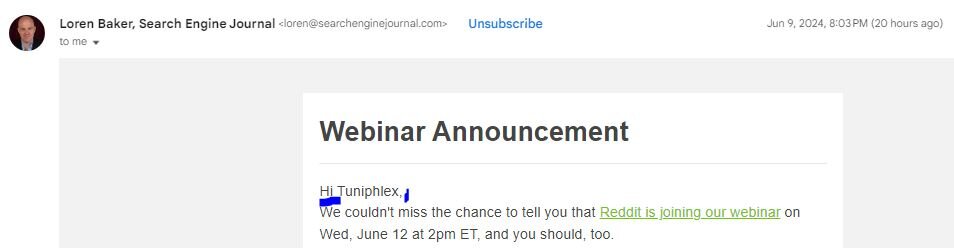
The more details you have on your recipients, the more customizations you can add here. But adding the first name is a good start.
2. Dynamic Call to Action (CTA)
With Dynamic email, you can tailor your call to action (CTA) to each recipient. What’s the goal? A custom CTA has the potential to convert a lot more users.
For instance, consider Spotify. A user who hasn’t used Spotify in a while may receive an email with the CTA “Get Back to Listening,” encouraging them to return to the platform. Meanwhile, a frequent user might see “Discover Weekly Playlist,” enticing them to explore new content.
This level of personalization ensures that each user receives a message that resonates with their specific usage patterns. It’s a great way to activate lapsed users.
3. Dynamic Visuals
Images and videos play a significant role in engaging users or prospects; they become even more effective when they are personalized.
Dynamic email allows you to include visual elements in your email for specific groups of people. Video prospecting platforms like Pitchlane allow sales teams to send personalized video messages along with their email.
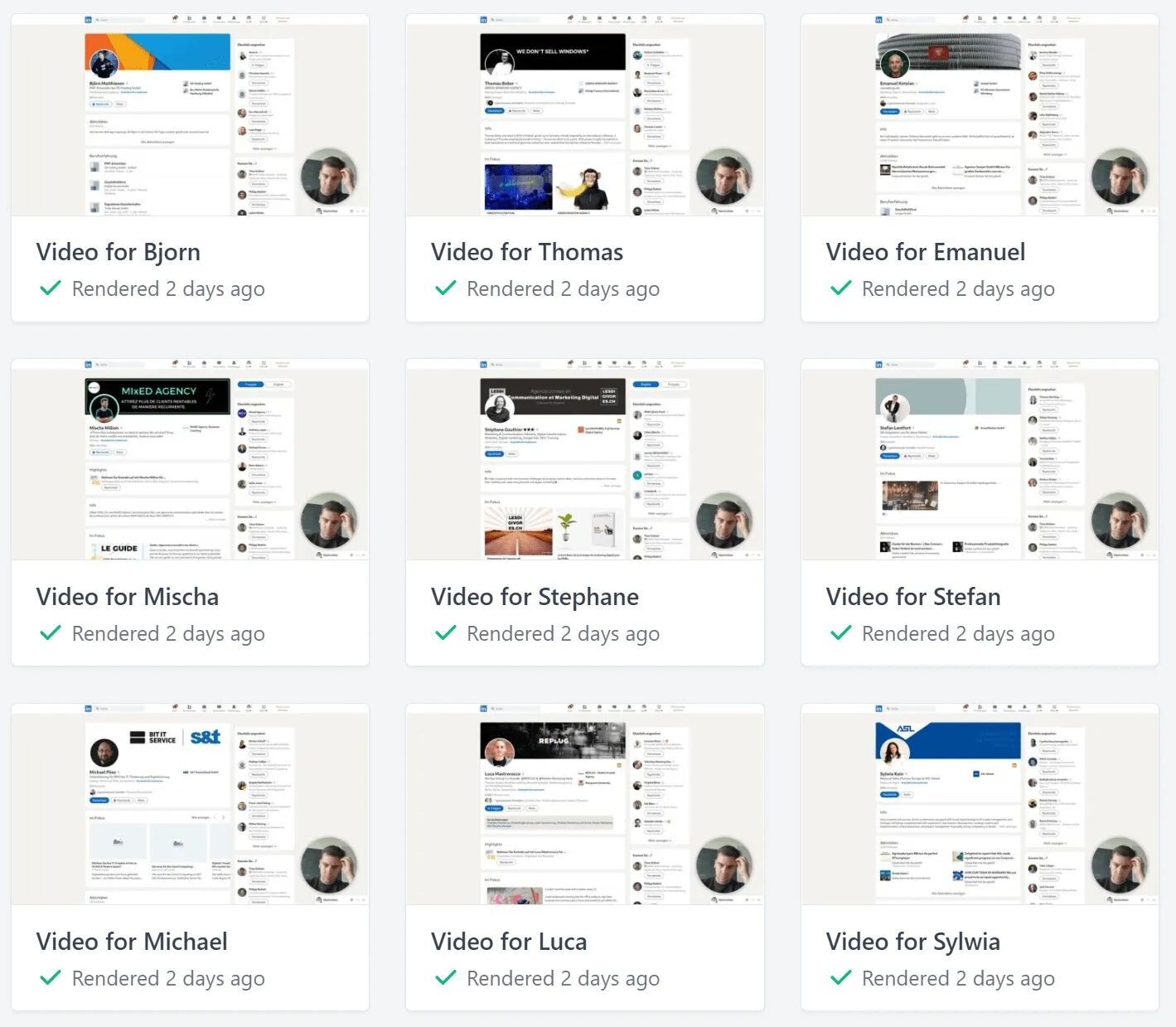
Basically, you can use this video content in your outreach to communicate whatever you want. And it only takes around 15 minutes to generate thousands of emails with your prospect’s name in the video.
Benefits of Using Dynamic Email Content
Increased Engagement: When recipients receive content that is specifically targeted to their interests, they are more likely to engage with it. Campaignmonitor mentioned in a report that an email with a personalized title alone increases the open rate by 26%.
Improved customer experience: Dynamic content is usually more helpful to your customers than static content. For example, by showing them products they have previously shown interest in or content related to their past behavior, you provide a more personalized and relevant purchasing experience.
Improved Conversion Rates: Customers are more likely to ignore generic emails that don’t address their specific needs or interests. However, personalized emails capture attention and drive higher engagement, ultimately leading to increased conversions.
Time Efficiency: Imagine writing 100 different individual emails with static email. Is that not time-consuming and tedious? But With dynamic email, you can create a single template and dynamically change the content based on the recipient’s data.
How to Effectively Set up a Dynamic Email Campaign
Data collection
The first step in setting up a dynamic email campaign is to gather data. As we explained earlier, dynamic emails are delivered based on recipient data. Gather detailed data about your subscribers through site tracking, surveys, and social media. You can also gather data on cold leads using lead gen platforms.
Collect data on subjects like:
1. Names
2. Location
3. Preferences
4. Past interactions
5. Purchase behaviors
Segment Your Audience
After gathering the necessary data, the next step is to segment your audience.
Divide your email list into targeted segments based on criteria such as demographics, purchase history, browsing behavior, and engagement levels. Segmentation enables you to tailor your content to the specific needs of each group, making your emails more relevant and effective.
Email Marketing Platform
To successfully set up a dynamic email campaign, you need a reliable email marketing platform that supports it. Pitchlane is one of those platforms as we allow you to embed personalized video messages within your email content.
Personalized video messages can significantly boost your engagement rates, as they cater directly to your recipient’s interests and preferences leading to higher open and click-through rates.
Set up a Dynamic Email Template
Depending on the platform you choose, you can easily navigate and customize email templates using dynamic content blocks. For example, if you want the email greeting to automatically change to each recipient’s name, you simply insert dynamic placeholders like ‘Hello [Recipient Name]’. The platform will then replace the placeholder with the actual name of each recipient.
Create a Personalized Experience with Dynamic Emails
Dynamic Email is a powerful tool for personalization. It’s a hack that effortlessly captures your recipients’ attention without you needing to spend time on customization.
Pitchlane enables you to seamlessly incorporate personalized videos into your emails, creating a more compelling and engaging experience for your audience. You can get started with Pitchlane here.